
Hard thresholds such as "Alert if Temperature is greater than 100" are useful, but they miss many operational problems. A signal can drift, stop changing, jump too quickly, or arrive with gaps while still staying inside a fixed limit.
For standard threshold-based logic, see the Visual Rule Editor.
Proxus anomaly workflows are split into two clear modes:
- Inspect: Review a signal, its recent baseline, and grouped findings without creating or changing a rule.
- Candidate Review: Tune the selected anomaly types, preview the candidate rule, and create a rule that uses the same runtime detector behavior.
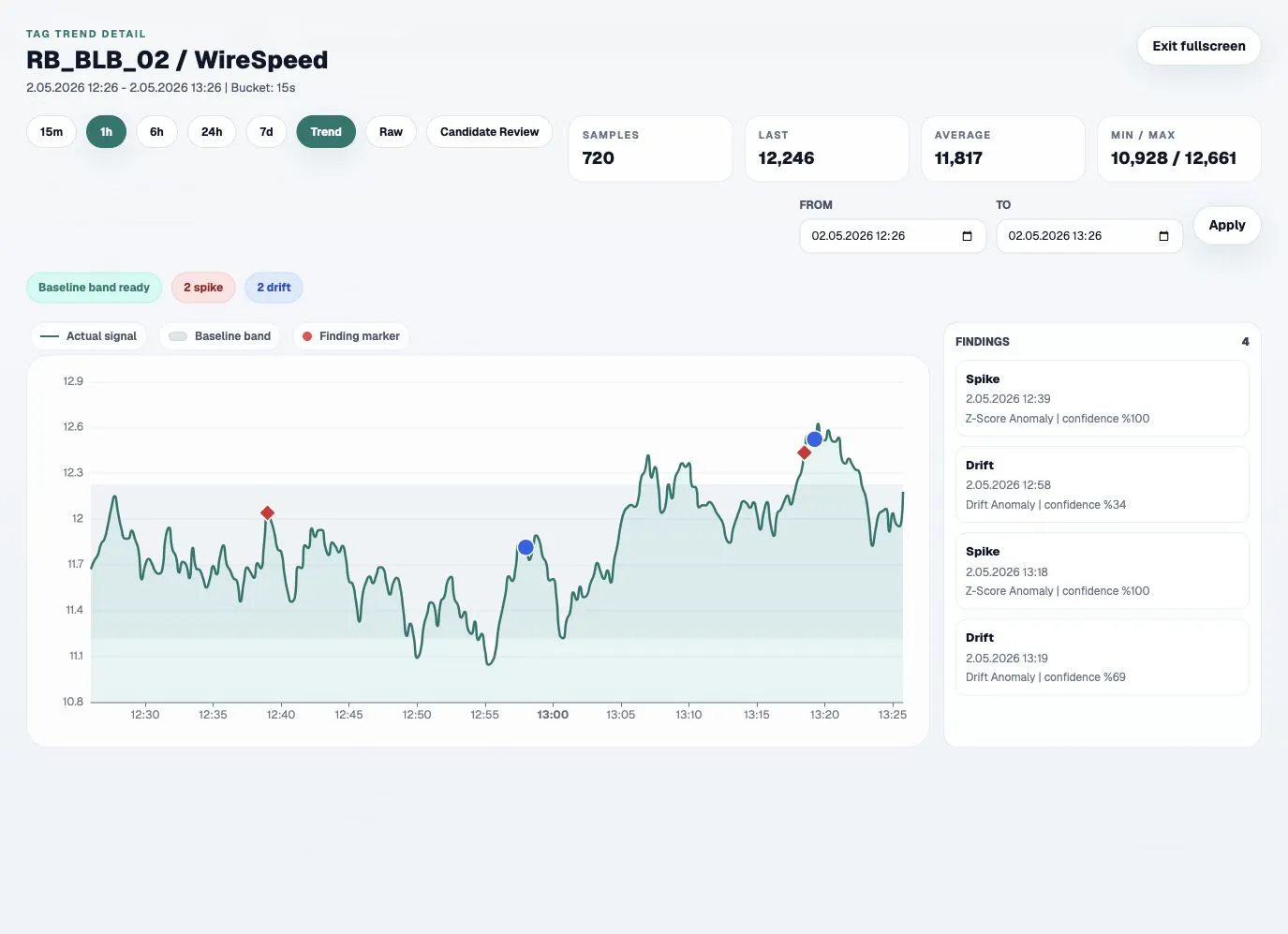
Supported Finding Types
| Finding | What it detects | Typical use |
|---|---|---|
| Spike | A sudden value far outside the learned baseline. | Sensor jumps, process shocks, short abnormal peaks. |
| Fast change | A value changing too quickly between samples. | Leaks, ruptures, fast pressure or speed changes. |
| Drift | A repeated movement away from the expected operating range. | Wear, calibration shift, gradual process degradation. |
| Flatline | A value that stops changing beyond the configured tolerance. | Frozen sensors, stuck counters, disconnected signal paths. |
| Gap | Missing data beyond the expected interval. | Communication loss, gateway interruption, source outages. |
Flatline findings are intentionally conservative in Inspect mode. Low-confidence flatlines are suppressed and nearby flatline findings are grouped so the chart stays useful instead of noisy.
From Review to Rule
Candidate Review is part of the rule creation flow, not just a chart annotation. When you create a rule from a candidate:
- selected anomaly types are written to the rule
- device and tag scope are carried into the rule preview
- sensitivity settings such as analysis window, rate-of-change, drift, flatline, and gap behavior are preserved
- runtime evaluation follows the same anomaly semantics shown during review
The baseline band helps operators understand recent expected behavior. It is a review aid, while selected anomaly types and thresholds define what the runtime rule will evaluate.
Filtering and Scope
Rules still use the Criteria Expression field to define which data should be evaluated.
- No criteria: Numeric values in the rule scope can be evaluated.
- With criteria: Only packets matching the criteria contribute to anomaly evaluation.
- Packets outside the criteria do not update the detector state for that rule.
Example:
[Payload][Key = 'Vibration']Use a criteria filter when an anomaly rule should only watch selected tags or a specific process state.
Operational Guidance
Start with Inspect mode to understand the signal. Move to Candidate Review only when the findings are meaningful enough to become automation.
For production rules, prefer:
- a stable device and tag scope
- enough history to build a meaningful baseline
- conservative flatline and gap settings for noisy sources
- clear rule names that identify the machine, signal, and anomaly type
After a gateway restart or a newly enabled rule, anomaly evaluation needs enough samples to rebuild its short-term baseline. During warm-up, Proxus avoids producing findings from insufficient history.