
Outbound Connectors send copies of your telemetry to external systems while Proxus continues to store data internally. Use them to feed data lakes, analytics platforms, or enterprise messaging backbones.
Each connector also has a runtime health status. This status is produced by the active data path, not just by the UI form. It helps operators see whether a connector is configured, running, degraded, stopped, or unused.
Edge Gateway
Data Source
Outbound Router
Parallel Dispatch
Databases
ClickHouse / Postgres
Messaging
Kafka / MQTT
Cloud IoT
AWS / Azure
Connector Categories
Databases
| Connector | Page | Description |
|---|---|---|
| ClickHouse | Guide | High-performance columnar OLAP with Async Inserts and LZ4 |
| PostgreSQL | Guide | Relational database with auto table creation |
| MySQL | Guide | Relational database with batch inserts |
| SQL Server | Guide | Microsoft SQL Server with bulk copy |
| Oracle | Guide | Enterprise database with batch operations |
| InfluxDB | Guide | Time-series database with line protocol |
| Redis | Guide | In-memory key-value store with pub/sub |
| TDengine | Guide | Time-series database with WebSocket and Super Tables |
| SQLite | Guide | Lightweight local database |
| Firebird | Guide | Embedded/server relational database |
| IBM DB2 | Guide | Enterprise mainframe database |
Messaging
| Connector | Page | Description |
|---|---|---|
| MQTT | Guide | QoS support, TLS, in-memory reactive buffering |
| Apache Kafka | Guide | High-throughput with partitioning and replication |
| RabbitMQ | Guide | AMQP protocol with exchanges and routing keys |
Cloud IoT
| Connector | Page | Description |
|---|---|---|
| AWS IoT Core | Guide | X.509 certificate auth over MQTT |
| Azure IoT Hub | Guide | Device telemetry via MQTT over TLS |
| Sparkplug B | Guide | Eclipse Sparkplug B with device lifecycle |
Analytics & API
| Connector | Page | Description |
|---|---|---|
| Splunk | Guide | HEC forwarding with SSL and acknowledgment |
| Azure Data Lake | Guide | Gen2 export with Parquet, JSON, and CSV |
| HTTP API | Guide | Flexible HTTP export with authentication |
When to Use Outbound Connectors
- Enterprise analytics: stream telemetry to your data lake or BI stack.
- IT/OT integration: publish data to Kafka or MQTT for downstream services.
- Cloud ingestion: forward device data to managed IoT platforms.
- Rule-driven exports: trigger outbound channels from the Rules Engine when conditions match.
If you are looking for device connectivity (OPC UA, Modbus, Siemens S7, etc.), see Protocols.
Runtime Status
Outbound connector status is visible in the Outbound Channels list and in the device Outbound Channels tab.
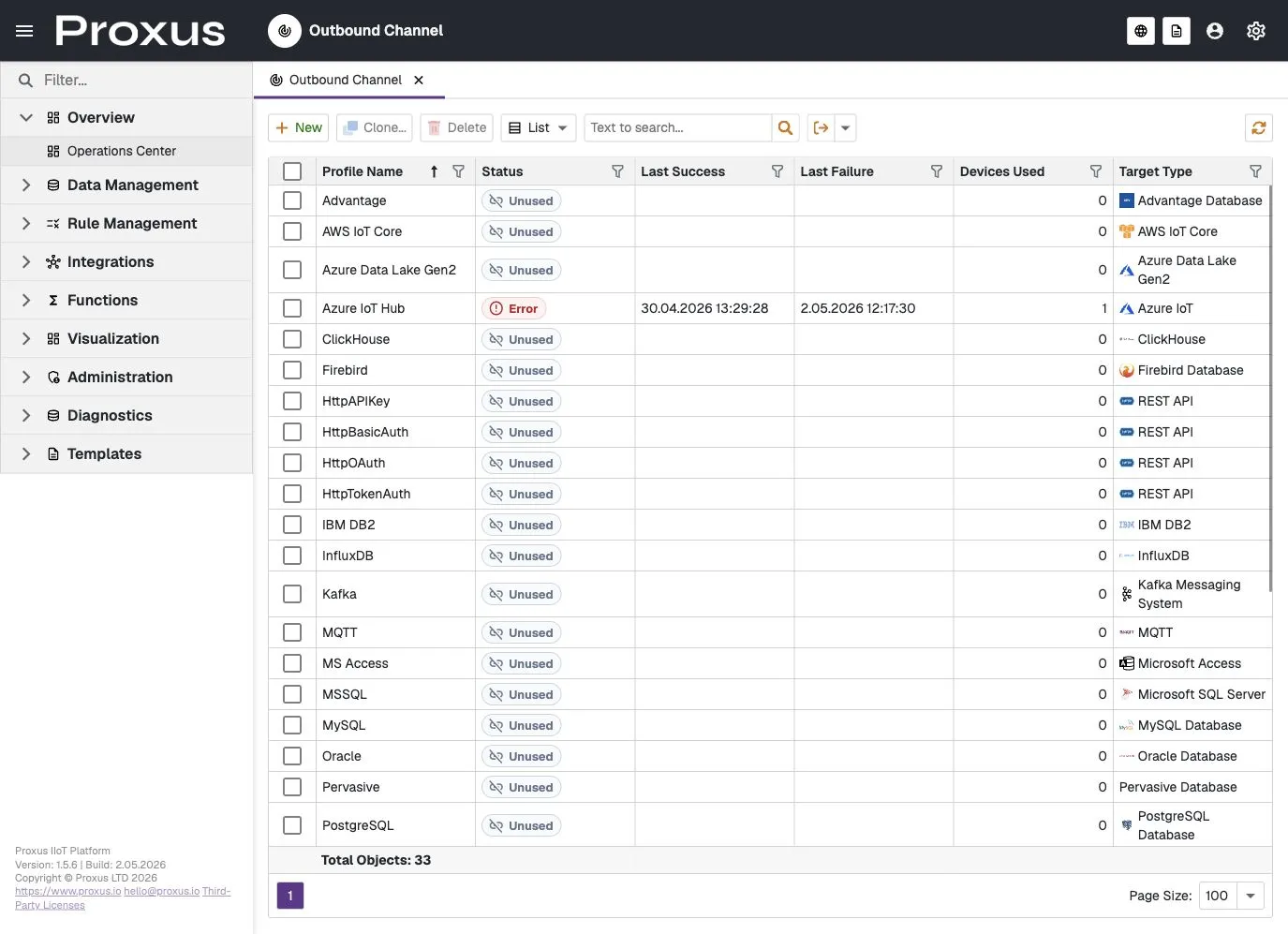
| Status | Meaning |
|---|---|
| Ready | The connector configuration was accepted and the runtime is ready to send data. |
| Running | The connector has successfully sent data. |
| Degraded | The connector sent data before, but the latest attempt failed. Existing data flow should be investigated. |
| Error | The connector failed before a successful send. Check the connector parameters and System Logs. |
| Stopped | The connector was removed, stopped, or no longer has an active runtime worker. |
| Not used | The connector exists but is not assigned to a device or rule action. This is not a failure state. |
Start with the connector's status, last success, last failure, and safe error summary. For deeper evidence, open System Logs and generate a support bundle for the affected time range.
Device and Rule Usage
Connectors can be used in two ways:
- Device routing: A device sends its telemetry to one or more outbound channels.
- Rule-driven actions: A rule triggers an outbound action only when its condition matches.
The Devices Used column helps distinguish a connector that is actively assigned from one that is available but not currently used.